

Last Updated on March 19, 2026 by Larious
As we all know, AI tools are everywhere, and we have to admit that they are helpful too. These tools are now increasingly being used to generate text, images, and even videos.
One of the most popular AI tools is Gemini from Google. It can generate text, images, and even videos. Now it looks like it can generate music for you, too.
Table of Contents
Music Generation with Google Gemini
The Gemini app that you use through the web browser or on your mobile now features the most advanced music generation model, Lyria 3.
It’s an AI music generator that can transform your text or image prompts into 30-second tracks, complete with instrumentals, vocals, and lyrics.
You even have the option to turn any moment, a specific feeling, or even a photo into a custom soundtrack.
How to Generate Music with Gemini AI?
You can use the Gemini web app or the mobile app to generate music. Here are detailed steps on how to do it.
1. Open Google Chrome and visit this webpage.
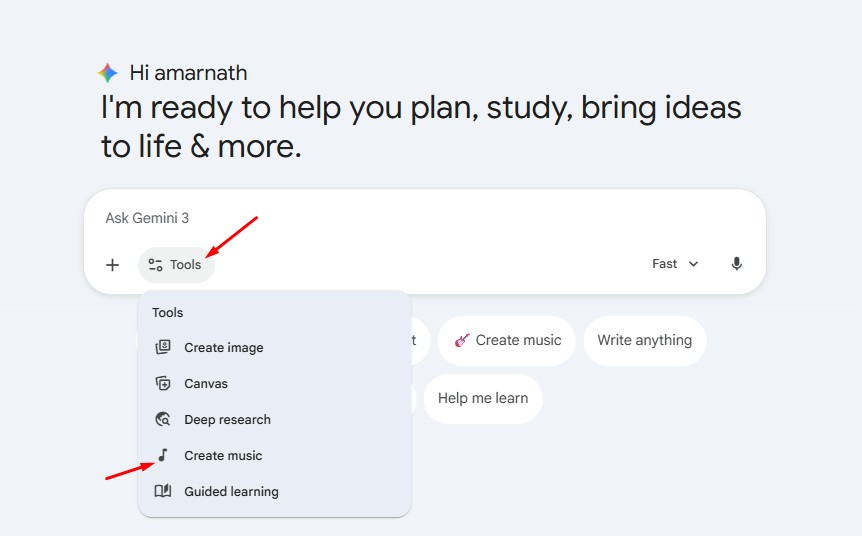
2. Click the Tools dropdown and select Create Music.
3. Now you can pick a track to remix across Latin pop, Folk Ballad, Workout, etc.
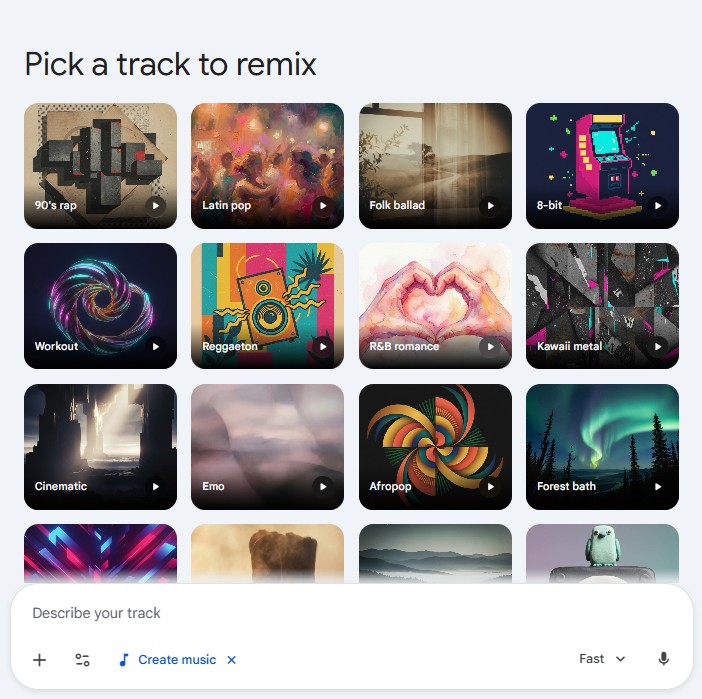
4. You can also use the Text to Track feature. For that, you need to describe a specific genre, mood, or memory to create unique tracks with lyrics.

5. Or else, you can upload a photo or video and watch Gemini use the content to compose a track with lyrics. It will create a track that fits the mood perfectly.
According to Google, the Lyria 3 model has a SynthID watermark. This is to identify AI-generated content.
This article explains how to generate AI music with Gemini. If you need more help in creating your first AI music, let us know in the comments.

