

Last Updated on August 31, 2025 by Larious
A lot of Android phone users were surprised to find their Google Dialer app looking different. The app’s new look is a part of Google’s new Material 3 design rollout.
However, the redesign has frustrated many users. The old split between Recents and Favourites is gone; they now appear together in the Home tab.
In addition, the keypad, which previously appeared on the same screen, is now moved to a separate section. The contact option is also no longer displayed up front.
Table of Contents
How to Revert to the Old Google Dialer UI?
If you miss that old layout, there’s a way to get it back. The Google dialer app doesn’t have an official switch to change the layout, but there are workarounds you can try.
Uninstall the Updates from the Play Store
The one working method to switch back to the old UI is to uninstall the Google Phone app updates from the Play Store.
1. Launch the Google Play Store on your phone.
2. Search for the Phone by Google app and open it.
3. Tap the Uninstall button.
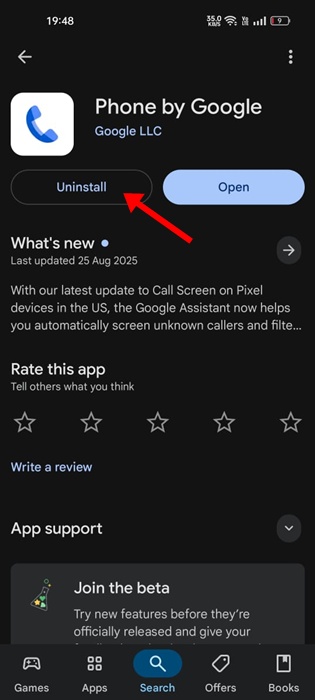
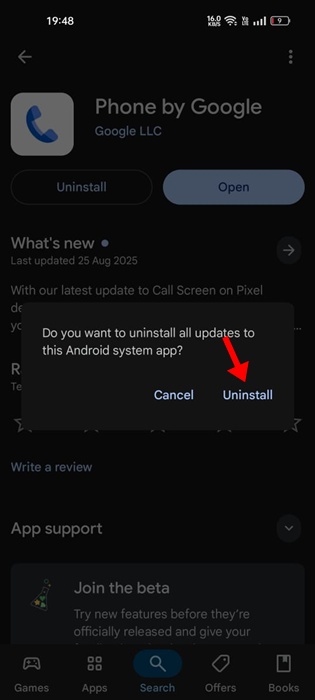
4. On the confirmation prompt, tap Uninstall again.
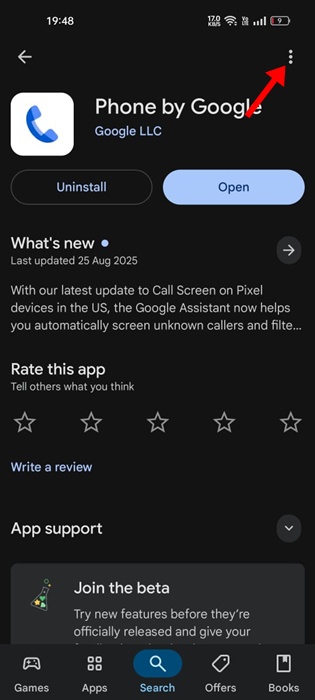
5. Tap the three dots at the top right.
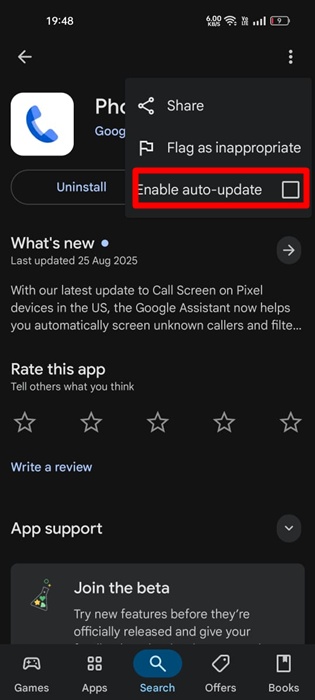
6. Uncheck the Enable auto-update option.
After making these changes, restart your Android phone. This should bring back the old Google Dialer UI.
If you want to enjoy the new one, you should update the Google Dialer/Phone by Google app from the Google Play Store.
This article explains how to switch back to the old Google Dialer UI on an Android phone. If you need more help on this topic, let us know in the comments.

