

Last Updated on August 17, 2026 by Larious
Just three weeks after the release of Gemini 3.6 Flash, Google announced its latest workhorse model, Gemini 3.7 Flash.
According to Google, 3.7 Flash showed strong gains over 3.6 Flash in coding tasks such as debugging and issue resolution. The new Gemini 3.7 Flash delivers an improved developer experience over 3.6 Flash – it adapts better to roadblocks, follows instructions with greater fidelity, and thinks more diligently.
Along with the new feature, the latest version of Gemini also includes a feature that lets you get rid of the visible watermarks appearing in the corner of the images created with the Nano Banana image model, videos made with Omni, and song lyrics generated with Lyria.
Table of Contents
How to Turn Off Media Watermarks on the Gemini App?
You can now hide the corner watermarks that accompanies AI-Generated media. The changes will apply to Nano Banana for images, Omni for Videos, and Lyria for music generation. To disable the watermark on Gemini, follow these steps.
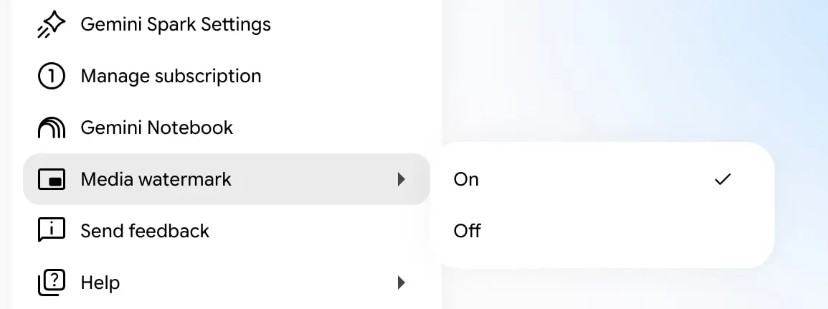
- Open the Gemini web version.
- Next, click the Settings gear icon in the bottom-left corner.
- Navigate to the new ‘Media Watermark’ section.
- Select either On or Off depending on your needs.
Once set, your selection sticks for all future image, video, and song generations.
Even if you turn off the toggle that removes the visible watermarks from the corner of your media, it doesn’t mean that the files you generated aren’t traceable.
Every piece of media that you generate through Gemini will still have an invisible SynthID watermark and C2PA provenance metadata embedded directly into the file.
So, it just means that you can’t see the watermark; it’s still there, but hidden. Another important thing is that Google mentioned that the option to disable the visible watermark won’t be available in countries where local laws mandate visible AI labeling.
The Update is Rolling Out Across Platforms
The 3.7 flash and the new watermark toggle are already live, but will take some more days or weeks to reach every user.
So, if you can’t see the 3.7 flash and the new watermark toggle, check whether your local laws mandate visible AI labeling. If everything falls in place, you may see the new feature within a few days or weeks.
This guide explains Gemini 3.7 Flash and the new watermark toggle. What’s your take on these two new features? Discuss with us in the comments. Also, if you find this guide helpful, share it with others.

