

Last Updated on July 12, 2026 by Larious
Just a few days ago, Google announced in a blog post that the Nano Banana 2 Lite and the Gemini Omni Flash are now available. In this guide, we will discuss the Nano Banana 2 Lite and how you can use it for free.
Table of Contents
Nano Banana 2 Lite
The Nano Banana 2 Lite is Google’s fastest, most cost-effective image model in the Nano Banana family yet. It’s designed for high throughput, speed, and scale.
This one is basically designed for people who currently use the original Nano Banana model. According to a few reports, Nano Banana 2 Lite can generate images in just about 4 seconds after the text input.
With such a fast response, Nano Banana 2 Lite is definitely good for prototyping. As per Google, the new image model is now available in Google AI Studio, Gemini API, and Gemini Enterprise Agent Platform.
You can even use Nano Banana 2 Lite from Google Flow.
How to try Nano Banana 2 Lite for free?
You can access Nano Banana 2 Lite for free, but you will have to either use Google AI Studio or Google Flow. Here’s a tutorial showing the steps to use Nano Banana 2 Lite on Google Flow.
1. Open your favorite web browser and visit this webpage.
2. Log in with your Google Account.
3. Create a new project.
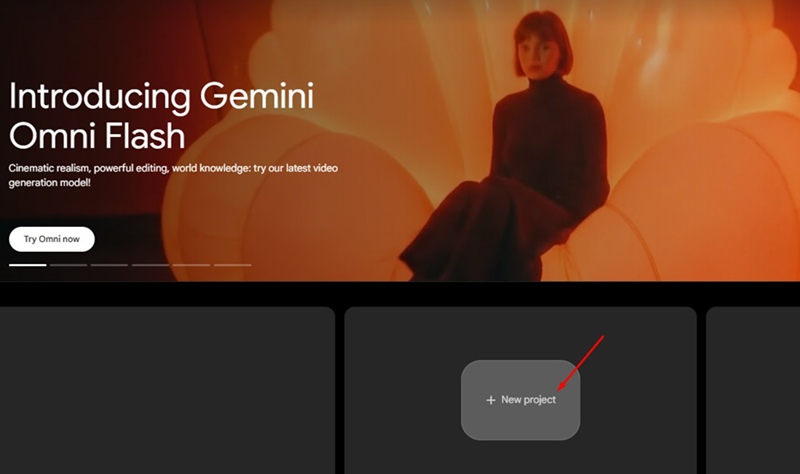
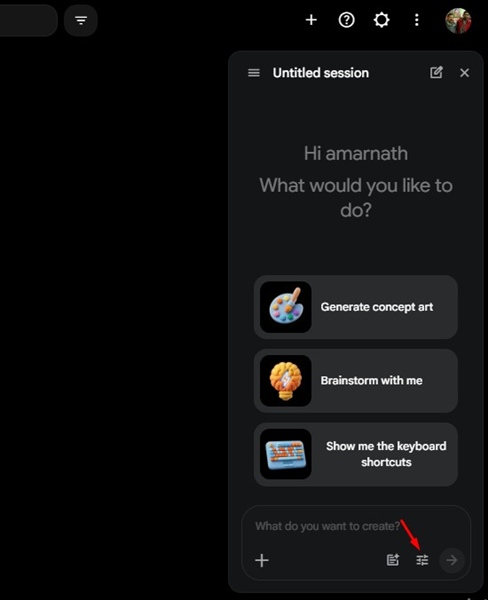
4. At the bottom right corner, click on the Settings icon.
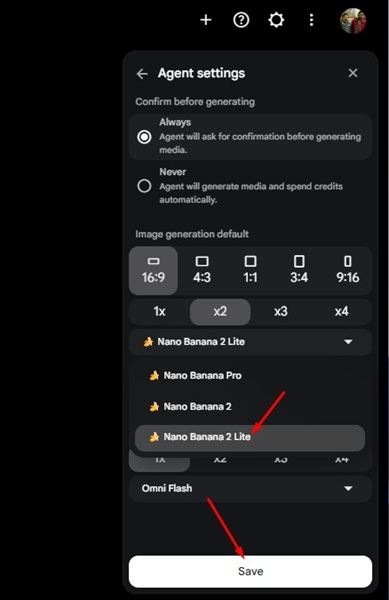
5. Select Nano Banana 2 Lite on the image model drop-down and click Save.
6. Type the text prompt for generating the image and press Enter.
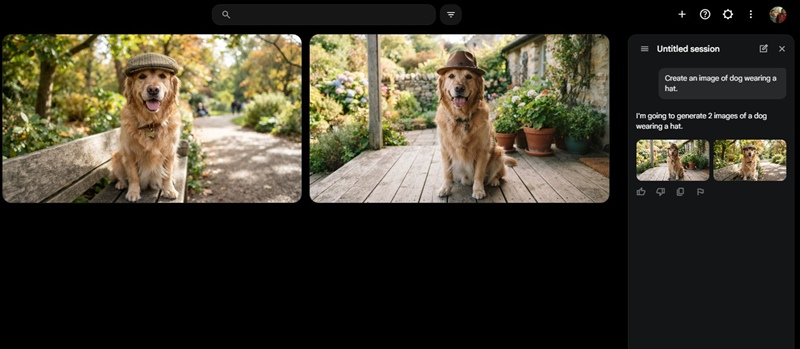
Alternatively, you can use the new Nano Banana 2 Lite from Google AI Studio. Just click on this link, type the image prompt and press Enter. The image will be generated within seconds.
Other than this, Gemini Omni Flash has been made available in Google AI Studio, the Gemini API, and the Gemini Enterprise Agent Platform for the first time. Omni Flash is also available in the Gemini app and Google Flow.
This guide shows how to use Nano Banana 2 Lite for free. If you need more help in using this new image model, let us know in the comments. Also, if you find this guide helpful, don’t forget to share it with your friends.

