

Last Updated on January 31, 2026 by Larious
AI videos have always been in the craze, but there is a lack of free tools that can create them. Google offered Veo for free, but only for a very limited time. Right now, one of the few free options available is Grok Imagine.
Grok Imagine lets you turn an image into videos in just a few seconds, and it’s completely free to use. The only limitation is the video length – it can generate 6-second videos only.
Table of Contents
Generating 10-second AI Videos with Grok
A few days ago, Elon Musk confirmed that xAI rolled out an upgrade to its Grok Imagine feature, allowing users to generate AI videos up to 10 seconds in length.
This is almost double the previous limit. Not only that, but Grok Imagine now produces better visuals along with better audio output.
How to Generate 10-Second AI Videos with Grok Imagine?
Before you start generating videos from your images, keep in mind that the feature may not be available on your account yet. It’s rolling out gradually, so some users already have access while others may need to wait.
In my case, the 10-second video option is available, but it requires a SuperGrok subscription. This feature may eventually roll out for free to all users, but for now, it’s limited to paid accounts.
To generate 10-second videos, follow these steps.
- Open the Grok website or its app.
- Switch to the Imagine tab.
- Enter a text prompt to generate an image.
- If you have an image, you can upload it.
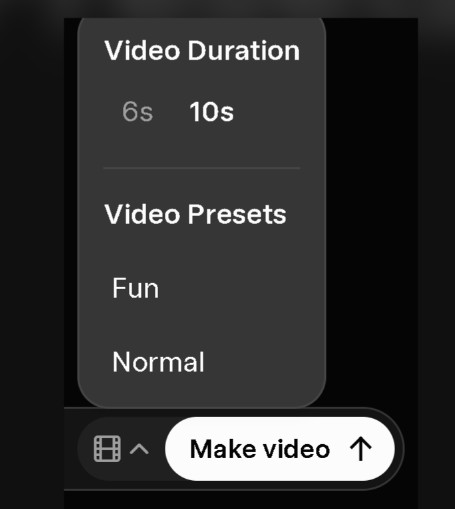
- Click on the Video options and select 10seconds on the Video Duration.
If your account is eligible, it will generate a 10-second video.
Previously limited to 6-second videos, Grok Imagine struggled to offer enough to its users. The new upgrade removes that limitation. So, what’s your take on this new upgrade? Let us know in the comments.

