

Last Updated on October 21, 2026 by Larious
A few days ago, Google launched a series of new features that are supposed to keep you safe from mobile scams. As scammers get more sophisticated, Android will now use the best of Google AI to keep you safe across calls, texts, and chat apps.
One of those features is ‘Enhanced Protection’ mode in Google Messages. According to Google, this new mode enables the most powerful and intelligent defenses to help you stay better protected against complex scam threats.
Enabling the Enhanced Protection Mode in Google Messages will unlock these things:
- Smarter link safety checks with Gemini Nano.
- Scam Detection enhanced with Private AI Compute.
- Built-in Checkpoints for unfamiliar links
How Do You Enable Enhanced Protection in Google Messages?
The Enhanced Protection feature isn’t yet available to any users; however, it will be rolling out in the coming weeks. Right now, only a selected group of users have access to these features.
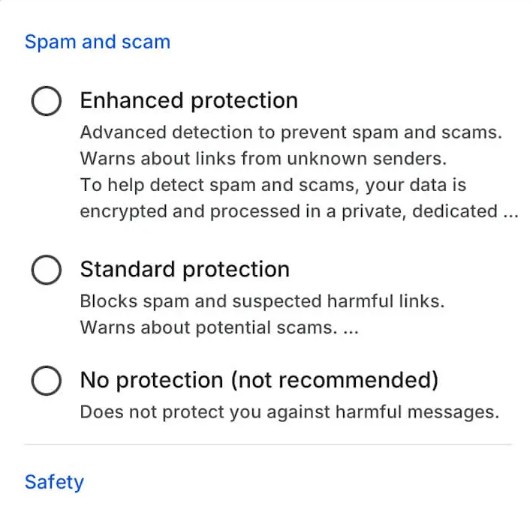
Right now, if you try to access the Protection & Safety settings of Google Messages, you will only find the ‘Spam Protection’ feature. However, when Google rolls out Enhanced Protection, you will see a different screen with three different options: Enhanced Protection, Standard Protection, and No Protection.
To check if your Google Messages app has access to this feature right now, follow these steps.
- Open the Google Messages app on your phone (Make sure to update the app from the Play Store).
- Tap on your Profile Picture in the top right corner.
- Scroll down and select Messages Settings.
- In Messages settings, scroll down and tap Protection and safety.
- Check if you have access to the Enhanced Protection feature.
If you don’t have this feature, wait for a few weeks. Google has yet to roll out the feature.
This article explains what the Enhanced Protection feature in Google Messages is and how you can enable it. If you need more information about this new feature, check out this webpage. If you find this guide helpful, share it with others.

