

Last Updated on October 27, 2026 by Larious
Google Chrome is known for being a resource hungry application. It can slow down your computer by eating up RAM resources. And the worst is that you can’t do much to free up RAM here.
What’s more concerning is that Chrome may keep running in the background, even after you’ve closed it. You may have noticed this: you’ve closed Chrome, but when you open Task Manager, it still appears to be running and using RAM.
Table of Contents
Why Does Chrome Keep Running After I Close It?
You will be surprised to find that even when you close the Chrome browser, it may still run in the background and use over 1GB of RAM. So, why does this happen?
Chrome has a setting that allows background apps and extensions to keep running even after you close the browser window. The feature lets deep seated Google features like Gemini stay awake silently in the background, even after you close the browser window.
This setting is responsible for apps and extensions to stay awake. This is why they can still send you instant alerts and notifications even when the browser is closed.
How to fix Chrome keeps running even after closing it
If you don’t want your Chrome browser to run in the background, even when it’s closed, you need to make a change in its settings. Here’s what you need to do.
1. Open the Chrome browser.
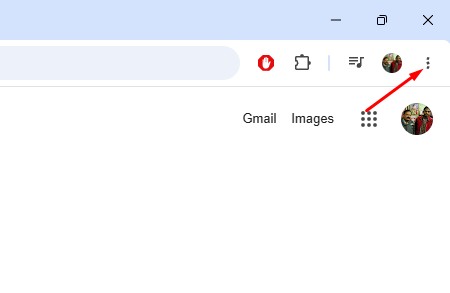
2. Click the three dots in the upper right corner.
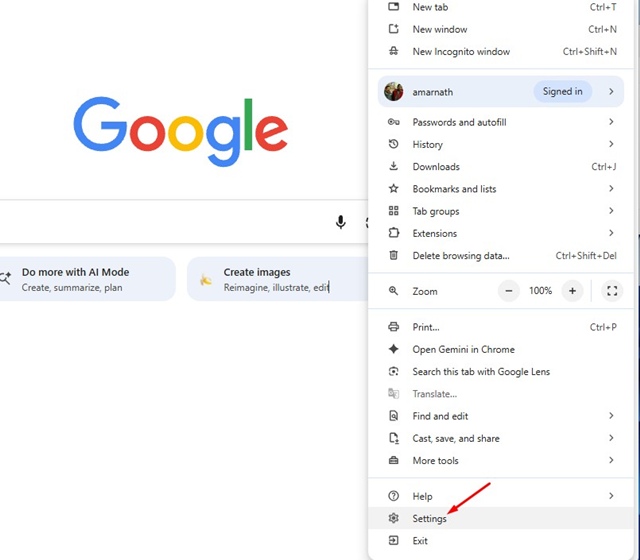
3. Next, click on Settings.
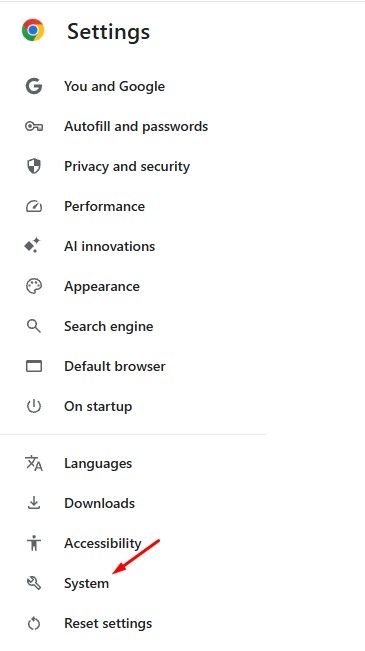
4. Switch to System.
5. Uncheck the ‘Continue running background apps when Chrome is Closed‘ option.
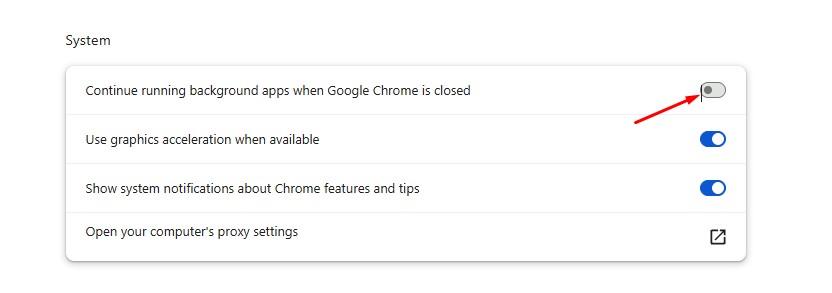
This is the simple change you need to make to Chrome’s Settings. After making this simple change, you will be able to free up at least 1GB or more of your memory, which slows down your PC.
This article explains how to fix Chrome keep using my PC even when closed. If you need more help on this topic, let us know in the comments.

