

Last Updated on October 13, 2025 by Larious
If you’re an Airtel user, you might already be using the Perplexity Pro for free. The AI chatbot is great as it can search the web for you, do research, come up with images, and give you access to multiple AI models.
It also has a feature called Memory that allows Perplexity to remember details between your conversations, making your interactions more personalized and efficient.
Table of Contents
How to Enable Perplexity Memory?
The memory feature is already enabled on your Perplexity account, regardless of whether it’s free or a pro.
Perplexity will call on memory and previous searches depending on the question and whether it thinks it can share a better response by using those sources.
If you feel that your Perplexity account misses out on this feature, here’s what you should do to enable it.
1. Open your favorite web browser and log in to this webpage.
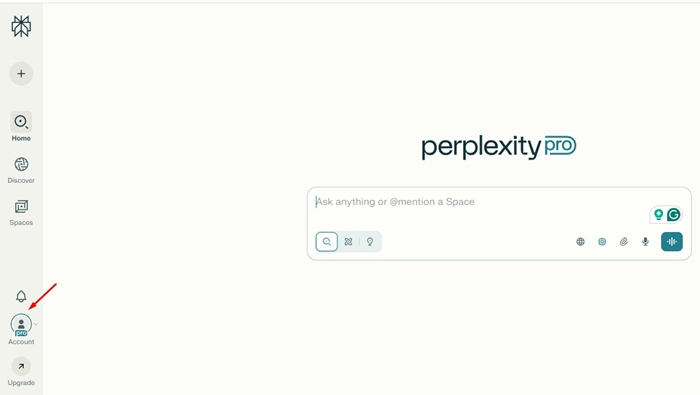
2. Tap on the Account tab in the left sidebar.
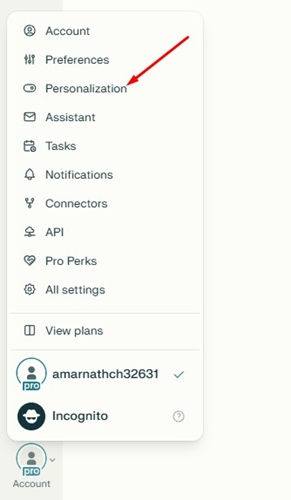
3. On the menu that appears, select Personalization.
4. Scroll to the Memory (Beta). Make sure the ‘Reference search library’ and ‘Reference saved memories’ are enabled.
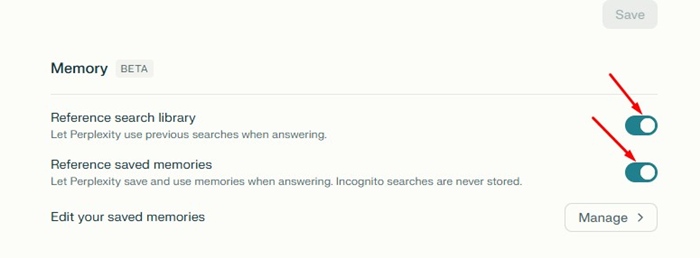
These two toggles will force Perplexity AI to build up memory.
How can I view my Memories?
You can view all memories in your Perplexity account Settings under the Personalize section.
1. Open your favorite web browser and log in to this webpage.
2. Tap on the Account tab in the left sidebar.
3. On the menu that appears, select Personalization.
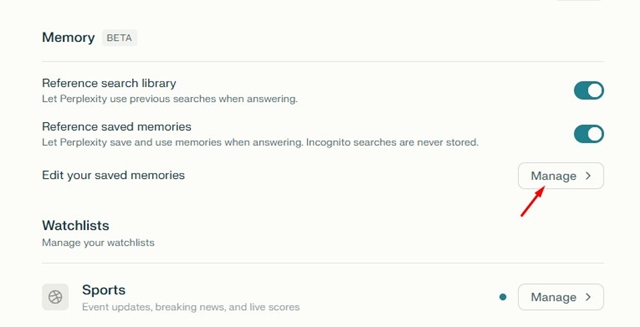
4. Click the Manage button beside Edit your saved memories.
How to Remove Certain Memories from showing up in future answers?
If you don’t want Perplexity to use a particular information that it has saved, you need to delete it from the Saved Memories. Here’s what you need to do.
- Open your favorite web browser and log in to this webpage.
- Tap on the Account tab in the left sidebar.
- On the menu that appears, select Personalization.
- Click the Manage button beside Edit your saved memories.
- Next, select the Memory that you want to delete and click the trash can icon beside it.
This article explains how to manage Memories on Perplexity AI. If you need more help on this topic, let us know in the comments.

