

Last Updated on November 26, 2026 by Larious
WhatsApp is already testing the ‘View Once’ feature on Android. In fact, it was made available to beta users. Now it looks like WhatsApp is testing the same ‘View Once’ feature for text messages on iOS.
You already have the ‘View Once’ feature on WhatsApp, but it’s currently limited to media files. Now, the same feature is being extended to text messages. It’s basically similar to the disappearing messages feature you see on other similar instant messaging or social networking apps.
Table of Contents
WhatsApp’s View Once Feature for Text Messages on iOS
WhatsApp’s view-once feature for text messages on iOS works the same way as on Android. You just type the text messages and select them to be viewed only once. Once the recipient views the text message, it will disappear from their chat.
All messages sent with ‘View Once’ turned on will disappear from the chat once the recipient closes it. Also, the View Once messages can’t be shared, forwarded, saved, or taken a screenshot of.
So, basically, WhatsApp has also made the View Once text more private. It will be an amazing addition to the popular instant messaging app.
How to use ‘View Once’ for text messages on iOS?
WhatsApp’s ‘View Once’ text messages feature is now available to beta users on iOS. According to reports from WABetainfo, the new feature is available only to some users on the beta version 26.45.10.73 of WhatsApp for iOS.
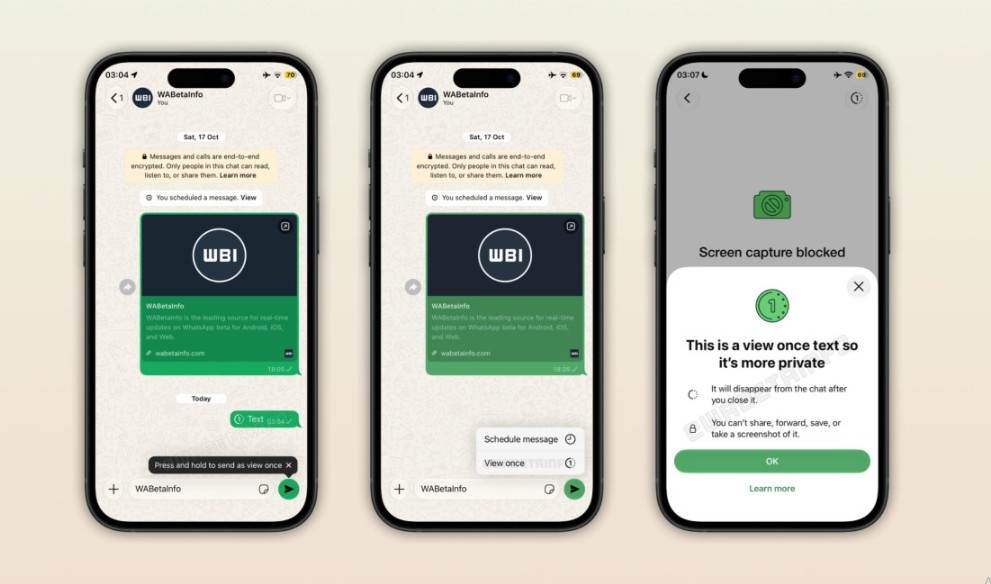
So, if you want to try your luck, you can go ahead and download WhatsApp Beta 26.45.10.73 for iOS. To use this feature, you need to type a text in the text box, press and hold the send button, then select View Once.
It will show you information about the new feature the first time you use it. Click OK to continue. Once the message is sent, the recipient must tap the view-once text in the chat to read it; the message will open in a separate interface.
And once the recipient closes the interface, they can’t reopen the message. Also, it’s important to note that once the message is gone, it won’t be available to both the sender and the receiver.
So, what do you think about the new View Once Text Messages feature on WhatsApp for iOS? Share your views with us in the comments.

